Form Magic
FormMagic is a simple, visual form builder that anyone can use to create professional forms in minutes. Just drag, drop, and configure - no technical skills required.
form builderdrag and drop form buildervisual form creatoronline form makerform generator+52more
FormMagic ✨
Create beautiful forms without any coding knowledge!
FormMagic is a simple, visual form builder that anyone can use to create
professional forms in minutes. Just drag, drop, and configure - no technical
skills required.
What Can You Build?
- 📝 Contact Forms - Let visitors reach out to you
- 📊 Surveys & Polls - Gather feedback and opinions
- 📋 Registration Forms - Sign-ups for events or services
- 🏢 Job Applications - Collect resumes and candidate info
- 📱 Feedback Forms - Customer reviews and suggestions
- 🎯 Lead Generation - Capture potential customer details
Why Choose FormMagic?
✅ No Coding Required - Visual drag-and-drop interface
✅ Works on All Devices - Mobile, tablet, and desktop friendly
✅ Smart Validation - Automatically check for valid emails, required
fields
✅ Professional Look - Clean, modern design that matches any website
✅ Quick Setup - Create forms in minutes, not hours
✅ Free to Use - No hidden costs or subscriptions
How to Create Your First Form
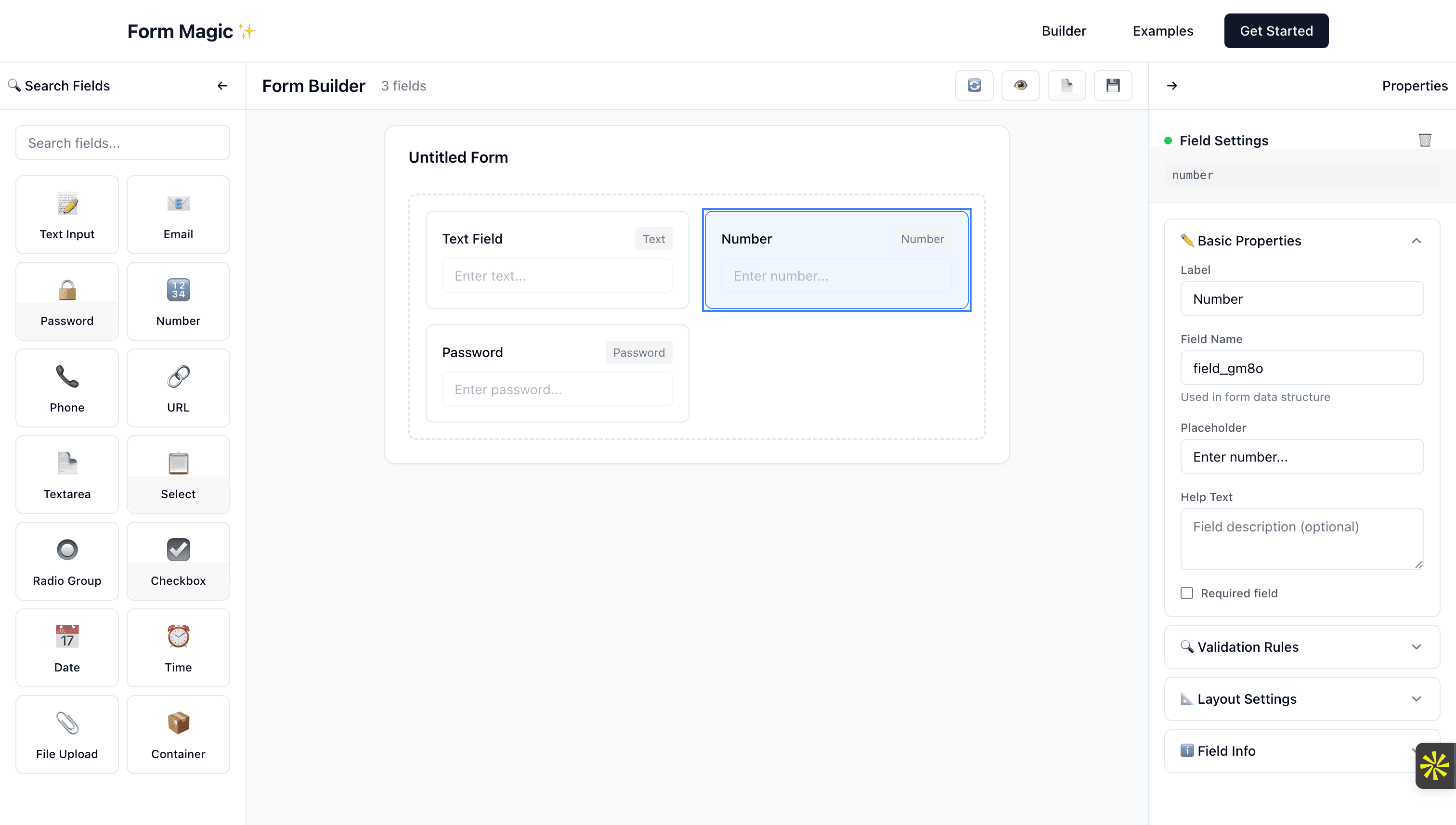
Step 1: Add Your Fields
- Look at the left panel - you'll see different field types (Text, Email,
etc.)
- Drag any field you want and drop it on the white canvas area
- Repeat until you have all the fields you need
Step 2: Customize Each Field
- Click on any field you added
- The right panel will show options for that field
- Change the label (what users see)
- Make it required if needed
- Add help text to guide users
Step 3: Organize Your Form
- Drag fields around to reorder them
- Use containers to group related fields together
- Adjust column width to make fields wider or narrower
Step 4: Test and Save
- Click the 👁️ Preview button to see how your form looks
- Click 💾 Save to keep your work
- Click 📄 View JSON to get the code for your website
Pro Tips for Better Forms
💡 Keep it short - Only ask for information you really need
💡 Use clear labels - "Full Name" instead of just "Name"
💡 Group related fields - Put address fields in a container
💡 Make important fields required - Email for contact forms
💡 Add help text - Explain what format you want
💡 Test on mobile - Many users will fill forms on their phones
Common Use Cases
For Small Businesses
- Customer contact forms
- Service request forms
- Newsletter signups
- Event registrations
For Organizations
- Volunteer applications
- Membership forms
- Feedback surveys
- Donation forms
For Personal Use
- Party RSVPs
- Survey friends and family
- Collect information for events
- Simple contact forms for personal websites
For Developers
Developers can integrate FormMagic into their applications using our NPM
packages:
- @form-magic/configurator - The visual form builder component
- @form-magic/renderer - Render forms from JSON schema
npm install @form-magic/configurator @form-magic/renderer
import { FormBuilder } from '@form-magic/configurator';
import { FormRenderer } from '@form-magic/renderer';

// Use the configurator to build forms
<FormBuilder onSave={handleFormSave} />

// Render forms from saved schema
<FormRenderer schema={formSchema} onSubmit={handleSubmit} />